The Best Lights for Streaming
How we picked: we weigh the strongest independent expert reviews, real manufacturer specs, and thousands of verified owner reviews, then name one clear pick per budget and use case. No fake lab tests, and we say plainly what we’d skip. Prices change, so we link out for today’s. Last checked 2026-07-31.
Good lighting is the single biggest upgrade to how you look on camera — it does more than a pricier webcam ever will. The trick is soft, even light on your face from the front, and there are a few good ways to get it depending on your space and budget. Here are six lights streamers and creators actually use, from an app-controlled key light to a budget panel and a ring.
 🦉 #1 PICK
Elgato Key Light
The set-it-and-forget-it light the pros clamp to their desk.
The 6 top picks
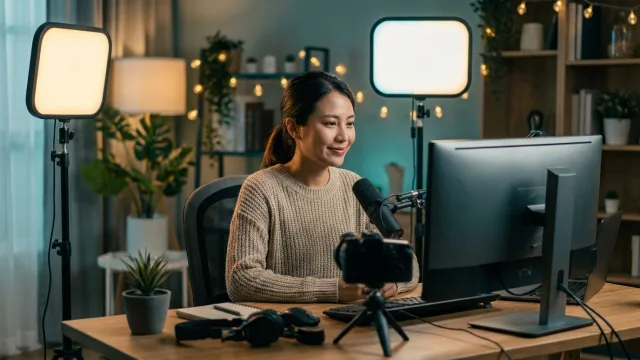
Elgato Key Light
Best overallBest for: Streamers who want set-and-forget, app-controlled lighting that mounts cleanly to the desk.
The Key Light is the streamer standard: a bright, soft edge-lit panel on a desk-clamp pole that you control entirely from an app or Stream Deck — brightness and color temperature without touching it. It gets your face evenly lit and stays out of frame. Premium, but it removes lighting as a thing you ever think about again.
- Full app / Stream Deck control
- Soft, even, flattering output
- Desk clamp keeps it off the floor
- Premium price
- Needs Wi-Fi for app control
🦉 Owl's take: The set-it-and-forget-it light the pros clamp to their desk.
Elgato Key Light Air
Best value key lightBest for: Streamers who want the Elgato app control and quality in a smaller, cheaper package.
The Key Light Air trims the size and price of the standard Key Light while keeping the same app control and soft output. It's a touch less bright and a bit smaller, which is plenty for a single-person desk setup. The easiest way into the Elgato lighting ecosystem.
- Same app / Stream Deck control
- More affordable than the standard
- Compact footprint
- Dimmer than the full Key Light
- Still needs Wi-Fi
🦉 Owl's take: Most of the Key Light's magic, smaller and cheaper.
Neewer 660 LED Panel
Best budgetBest for: Creators who want lots of adjustable light for the money and don't mind manual dials or a remote.
A Neewer LED panel (often sold in a two-light kit with stands) gives you a huge amount of adjustable, bicolor light for a fraction of a name-brand key light. You control it with on-unit dials or a remote rather than an app, but the output is genuinely good. The value pick that lights a whole scene, not just a face.
- Excellent brightness for the price
- Adjustable color temperature
- Often includes stands
- No app control
- Stands take floor space
🦉 Owl's take: The most light for the least money, app control aside.
Lume Cube Panel Mini
Best portableBest for: Creators who film in different spots or want a small fill light that runs on its own battery.
The Panel Mini is a pocket-sized, rechargeable LED with adjustable brightness and color temperature that clips onto a laptop or sits on a small stand. It won't light a whole room, but as a face light for calls or a travel fill it's excellent. Grab-and-go lighting that lives in a bag.
- Small and rechargeable
- Adjustable brightness and color
- Clips to a laptop
- Not bright enough as a sole key
- Short-ish battery at full power
🦉 Owl's take: A rechargeable pocket light for anywhere you film.
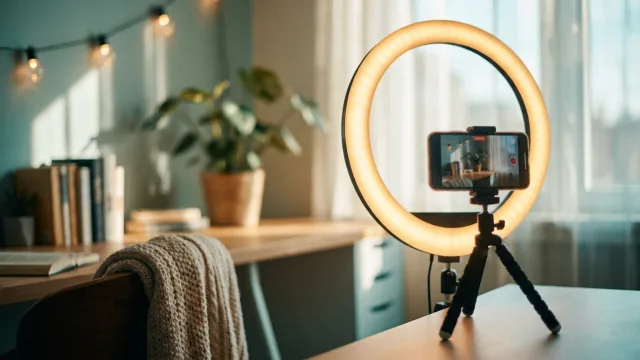
Neewer 18-inch Ring Light
Best ring light optionBest for: Creators who prefer the even, catchlight look of a ring and film mostly head-on.
If you like the signature even, shadowless ring look — and the round catchlight in your eyes — a large 18-inch ring light delivers it cheaply. It works best filming straight into it, and it doubles as a phone or camera mount. See our full ring-light guide for more options.
- Even, shadowless face light
- Doubles as a phone mount
- Inexpensive
- Reflects in glasses
- Only flatters head-on angles
🦉 Owl's take: The classic ring look, big and affordable.
Govee RGB Light Bars
Best background ambienceBest for: Streamers who want colorful backlight and scene ambience behind them, not face lighting.
These aren't face lights — they're for the vibe behind you. RGB light bars add depth and color to your background so your stream doesn't look flat, and they sync to music or scenes via an app. Pair them with a key light up front for a setup that looks intentional.
- Rich RGB background color
- App control and scene sync
- Cheap way to add depth
- Not a face light
- Best combined with a key light
🦉 Owl's take: The colorful backdrop glow that makes a setup pop.
Compare all 6
| Pick | Best for | Type | Control | Power | |
|---|---|---|---|---|---|
| Elgato Key Light | Best overall | Edge-lit panel | App / Stream Deck | Mains | Check ↗ |
| Elgato Key Light Air | Best value key light | Edge-lit panel | App / Stream Deck | Mains | Check ↗ |
| Neewer 660 LED Panel | Best budget | LED panel | Dial / remote | Mains or battery | Check ↗ |
| Lume Cube Panel Mini | Best portable | Portable LED | On-unit | Battery | Check ↗ |
| Neewer 18-inch Ring Light | Best ring light option | Ring light | Dial / remote | Mains | Check ↗ |
| Govee RGB Light Bars | Best background ambience | RGB bars | App | Mains / USB | Check ↗ |
How we choose (and why we don't fake lab tests)
Plenty of sites claim a lab they don't have. We won't. The Gear Owl reads the strongest independent expert reviews, the real manufacturer specs, and thousands of verified owner reviews, then distills them into one clear pick per budget and use case. When a product shines only in specific conditions, we say so. And we link out for live prices, because a price printed today is wrong tomorrow — you deserve the real number, not a stale one.
What we'd skip (and why)
Being honest about what not to buy is half the value of a guide. These come up a lot — we'd pass.
How to choose
One good light in front beats three behind
The mistake is buying a big kit before nailing the basics. A single soft light in front of you at eye level, slightly above, fixes 90% of how you look on camera. Add background or fill lights only once your key light is sorted. Our ring light guide covers the round-light route if you prefer it.
App control vs dials
App-controlled lights (Elgato) let you tweak brightness and warmth from a Stream Deck mid-stream without leaving your chair — worth it if you stream regularly. Dial or remote panels (Neewer) are cheaper and perfectly good if you set your light once and leave it. Match it to how often you fiddle.
Color temperature matters
Match your light's color temperature to your room. Mixing a cool daylight panel with warm room bulbs makes you look off-color. Bicolor lights (adjustable warm-to-cool) let you match whatever else is on, which is why every pick here is adjustable.
Frequently asked questions
What's the best light for streaming?
For most streamers, the Elgato Key Light, because it's bright, soft, and fully app/Stream Deck controlled so you never touch it mid-stream. On a budget, a Neewer LED panel gives you the most adjustable light for the money; for travel, the Lume Cube Panel Mini.
Do I need a key light or is a ring light enough?
A ring light works if you film head-on and like the even, catchlight look. A key light (a soft panel off to one side and slightly above) generally looks more natural and flatters more angles, and doesn't reflect in glasses. Many creators end up preferring a panel.
How many lights do I actually need?
One good soft light in front of you handles most of the job. A second light for the background adds depth once your face is well lit. You rarely need a full three-point kit for streaming or calls — start with one and add only if you see a reason.
Where should I put my streaming light?
In front of you, slightly above eye level, angled down at about 45 degrees so it lights your face evenly without harsh shadows. Avoid lighting from below or directly behind you. If you wear glasses, raise the light and angle it to kill reflections.
Are expensive lights worth it over budget panels?
The main thing you pay extra for is app control, build quality, and consistent color. If you stream often and want to adjust from your chair, an Elgato is worth it. If you set a light once and leave it, a good budget bicolor panel gets you 90% of the way for much less.